Virtual Interview Tips: A Practical Checklist From Setup to Follow-Up
Use these virtual interview tips to set up your tech, look and sound professional on camera, answer remote-work questions, and follow up the right way.
 JobzseekerAI Team7 min read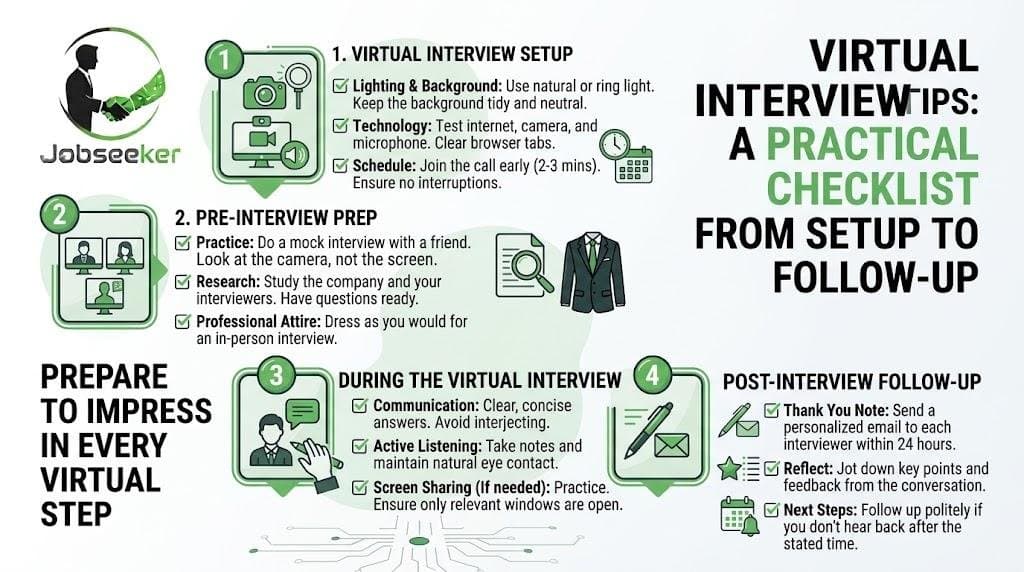
Three minutes before the call, your laptop decides it needs an update. Or your microphone works perfectly in every app except the one the interviewer uses. Or the hiring manager joins, and the first thing they see is a laundry basket behind you.
Video interviews remove the commute, but they add new ways for small things to go wrong. The candidates who come across best usually aren't the most polished speakers. They're the ones who prepared their setup so well that the technology disappeared and the conversation took center stage.
These virtual interview tips are organized by timeline: what to do two days before, the morning of, during the call, and afterward.
Two Days Before: Your Virtual Interview Setup
Confirm the platform and test the actual link
Check the calendar invitation to see which platform you'll use and open the link early. For a Google Meet interview on a computer, you can usually join from a browser without installing anything. On a phone, you'll typically need the app. Either way, open the link ahead of time so you aren't troubleshooting at the last minute. Most platforms show a preview screen before you join, where you can check your camera and microphone.
Choose your device on purpose
A laptop or desktop is almost always better than a phone. It's more stable, easier to position, and leaves your hands free. If you must use a phone, prop it horizontally at eye level instead of holding it.
Check your internet and plan a backup
If possible, sit close to your router or use a wired connection. Close bandwidth-heavy apps such as cloud backups and streaming services. Keep your phone's hotspot ready as a backup, and save the interviewer's phone number or email so you can reach them quickly if the connection drops.
Set up camera, light, and sound
- Camera: place it at eye level. A stack of books under your laptop works fine. Frame yourself from mid-chest up, with a little space above your head.
- Light: face a window or a lamp. Light behind you turns you into a silhouette.
- Sound: wired earbuds or a headset usually sound clearer than a laptop microphone and reduce echo. Pick the quietest room available.
- Background: simple and tidy beats elaborate. A plain wall is fine. If you use a virtual background, test it first, since some create distracting edges around your head and hands.
Do a five-minute rehearsal
Record yourself answering one practice question. Watch it back with the sound on, then again with the sound off. You'll spot things you'd never notice live, such as looking down at your notes too often or speaking too quickly.
What to Wear to a Video Interview
Dress as you would for an in-person interview at the same company, at least from the waist up. For most office roles, that means business casual. For a startup, a clean, simple top is usually enough. Solid colors tend to look better on camera than tight stripes or small patterns, which can flicker on screen. Wear real pants too. If you need to stand up unexpectedly, you'll be glad you did.
Virtual Interview Tips for the Conversation Itself
Look at the camera when it counts
Looking at the interviewer's face on screen feels natural, but on their end, it looks like you're glancing down. You don't need to stare at the lens the whole time. Look at it when you're making an important point or finishing an answer. Moving the video window close to your camera helps.
Allow for lag
Even good connections have a slight delay. Wait a beat after the interviewer finishes before you answer. It prevents talking over each other and makes you appear calm.
Use notes, but sparingly
One advantage of a video interview is that you can keep a few notes nearby. Limit them to keywords: two or three stories you want to tell, numbers you want to mention, and your questions for the interviewer. A full script makes you sound like you're reading.
Prepare for screen sharing
If you might share a portfolio or work sample, close unrelated tabs and turn on "do not disturb" first. Nobody needs to see a personal message pop up mid-presentation.
Common Virtual Interview Questions for Remote Roles
If the job itself is remote or hybrid, expect questions about how you work when nobody's watching. Here are common ones and how to approach them.
"How do you stay productive when working remotely?" Describe a specific system: how you plan your week, which tools you use, and how you communicate progress. A concrete routine beats general claims about being self-motivated.
"Tell me about a time you worked with someone you'd never met in person." Use a short story with a clear situation, what you did, and the result. Emphasize how you built trust and kept communication clear across distance.
"How do you handle communication across time zones?" Mention practical habits, such as writing clear updates others can read later, sharing your working hours, and saving live meetings for decisions that need discussion.
"What does your home workspace look like?" Keep it brief and practical. Confirm you have a quiet space and reliable internet.
When the Technology Fails
Something may go wrong despite your preparation. What matters is how you handle it. If your video freezes, rejoin quickly. If you can't reconnect within a couple of minutes, call or email the interviewer: "I'm sorry, my connection dropped. I can rejoin by phone at this number, or we can reschedule if that's easier for you." Interviewers know technology fails. A calm, prepared response often leaves a better impression than a call that went perfectly.
One-Way Video Interviews
Some employers use recorded interviews, where you answer prompts on camera without anyone on the other end. The same setup rules apply. Read the instructions carefully, especially how much preparation time you get and whether retakes are allowed, and speak to the camera as if a person were listening.
After the Call: The Thank-You Email
Send a thank-you email after the interview, ideally within 24 hours. Keep it short and specific:
Subject: Thank you, Customer Support Lead interview
"Hi Priya, thank you for taking the time to speak with me today. I especially enjoyed hearing about the team's plan to expand support into Spanish-speaking markets. It's exactly the kind of project I'd be excited to help build. Please let me know if I can provide anything else. Best regards, Marcus"
Mentioning one detail from the conversation shows you were listening and helps the interviewer remember you.
How JobzseekerAI Handles Interview Scheduling
When a company connects with a candidate on JobzseekerAI, the platform's Connection Hub opens a chat, creates a Google Meet link, and sends a calendar invitation to both sides, with reminders before the meeting starts. The FAQ on video meetings describes the process. Since the link arrives in your calendar, you can run the setup steps above days in advance using the actual meeting.
If you're not on the platform yet, you can sign up as a job seeker for free. If you already have an account, sign in to check your upcoming conversations. To see how companies and candidates connect from match to meeting, visit the platform features overview.
Frequently Asked Questions
How early should I join a virtual interview?
+
Open the link about five minutes early to check your camera and microphone on the preview screen, then join on time or a minute or two early.
Is it okay to use a virtual background?
+
Yes, if it's simple and you've tested it. A blurred real background is often the safest choice because it looks natural.
What if a pet or family member interrupts?
+
Briefly apologize, mute if needed, deal with it, and continue. Most interviewers are understanding about a short, well-handled interruption.
Should I keep my camera on the whole time?
+
Yes, unless the interviewer suggests otherwise or you need to turn it off briefly to recover a weak connection. If so, say so.
Are video interview tips different for phone screens?
+
Many overlap: a quiet room, notes nearby, and a prompt thank-you. For phone screens, put more energy into your voice, since the interviewer can't see your expressions.
Prepare the Setup, Then Focus on the Conversation
A virtual interview is still an interview. The stories, the preparation, and the questions you ask matter most. What these virtual interview tips do is clear away the distractions, so your camera, sound, and connection fade into the background. Test everything two days out, rehearse once, plan for failure, and follow up within a day. Then walk into the call with nothing left to worry about except the conversation itself.
Let the right work find you.
Upload your CV once. JobzseekerAI matches you with companies, and your contact details stay hidden until a company unlocks your profile.
Create your free profile